The Prisoner of Azkaban Clock

Time travel plays a critical role in the climax of Harry Potter and the Prisoner of Azkaban, so Alfonso Cuarón decided to have some fun with elaborate shots that literally move right through a giant clock. Only one problem – the Hogwarts we’d seen in the first two films didn’t have any noteworthy clocks. So production designer Stuart Craig and his team created a new wing of the castle that comprised a crumbling courtyard, a rickety wooden bridge leading toward a new location for Hagrid’s hut, a new hospital wing, and…yes, an enormous clock tower.

These areas were realized as part of the main 1:24 scale Hogwarts miniature, as larger bespoke miniatures, and as partial physical sets. All of these were combined with visual effects to heavily feature this new area of the castle throughout the film, which is probably why this was the only film that really stood out to me in theaters as having redesigned parts of Hogwarts.

When we last saw the clock tower in my model, it looked a little something like this:
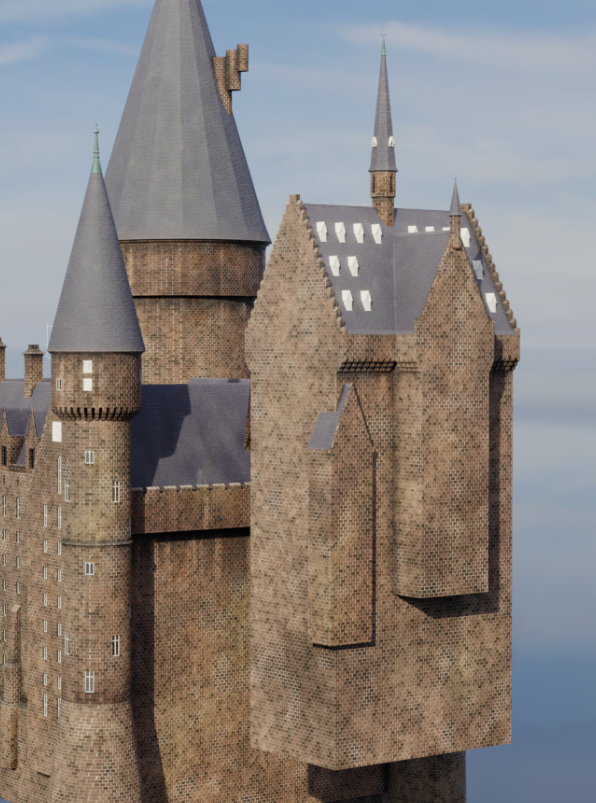
(Render from this post.)

Not exactly the most detailed model in the world. I’m not really sure why I stopped working on it, but no matter. It’s about time I finished it up. (Get it? About time?)

Anyway, for today we focus on…well, how we got to this:

That’s right, today we’re covering the clock face itself. This is the part for which I have the most detailed technical drawings, thanks to various photographers who’ve documented their adventures at the Warner Bros. Studio Tour.

The clock actually has two faces, forming a pair of intersecting circular patterns. I started by building each one independently, not worrying about the intersections or textures:

The clock face is separate from the tower for now; it will later be moved into position.

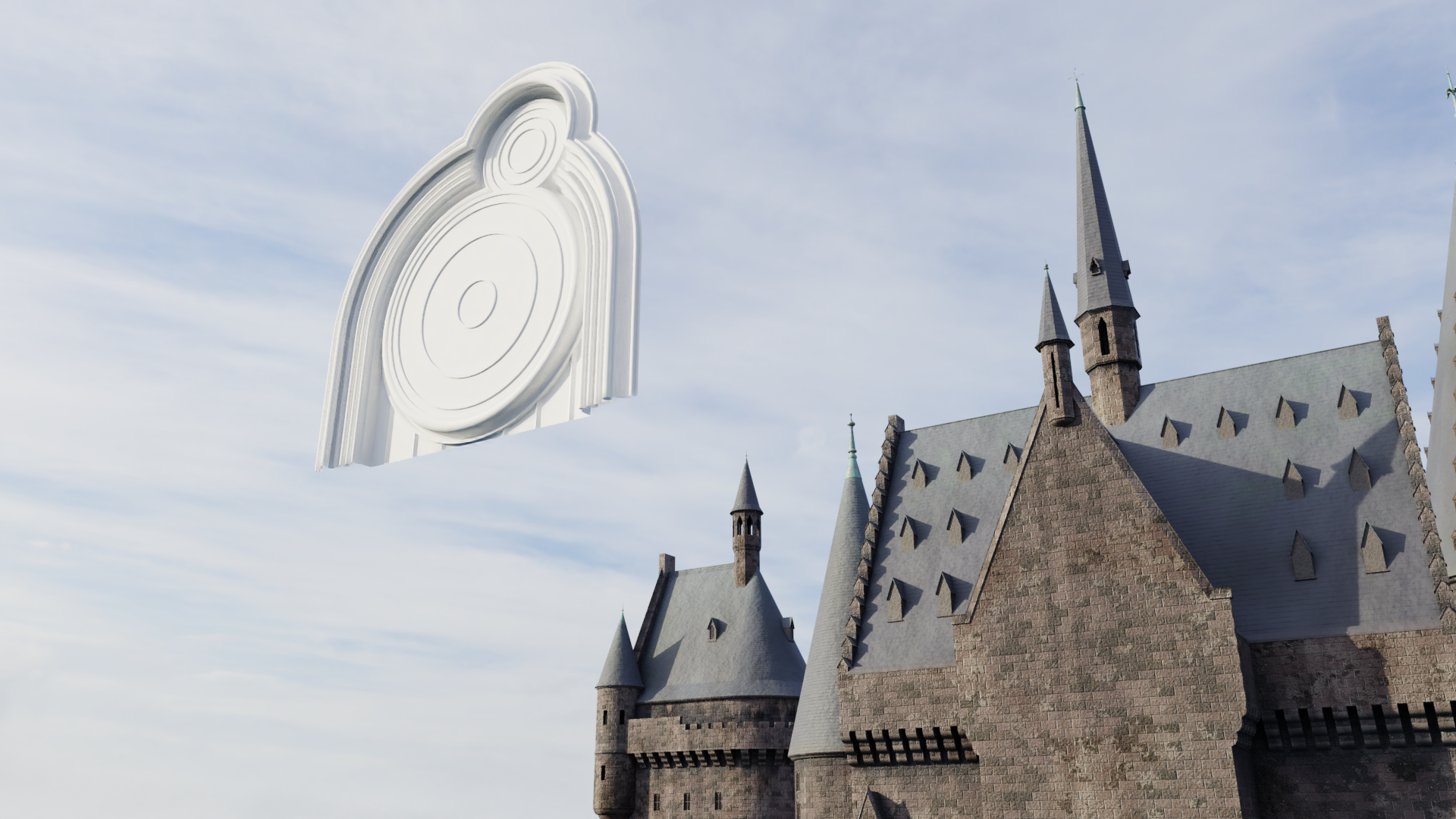
Then came the hardest part by far: cutting out the intersecting areas of the moulding around the circles. I’m not aware of a particularly quick or easy way to do this in Blender, but the TinyCAD add-on did remove some of the hassle. Still, I had to step away from the mess repeatedly. Here’s what it looked like during the process.

Eventually it all worked out, with fairly minimal “cheating” of the geometry. I went to bed haunted by visions of intersecting circles. (Not even kidding!) But it was gratifying to see the results:
I next decided it was time to add some textures – not so much because I cared what it looked like at this juncture, but because the different textures would help me visually distinguish between different components as I worked:

The clock face moves a little closer to the tower, in part to help me gauge the transparency of the glass material.

I wasn’t too sure how detailed I wanted to get when I first started the clock, but as I went, I became interested in greater and greater levels of detail. Soon, the complicated hands on the main face came together. (I stuck with the same time the clock shows in the beautiful transition to winter in the film, though I’m having some trouble figuring out exactly which hand is which…) EDIT: Just learned that this is an astronomical clock, and the extra elements aren’t just decorative! I think the smaller dial is for seconds, but they also had the minute hand move like a second hand in the film, probably to make the passage of time more visible. This also means I slightly fudged a few of the details…but oh well.
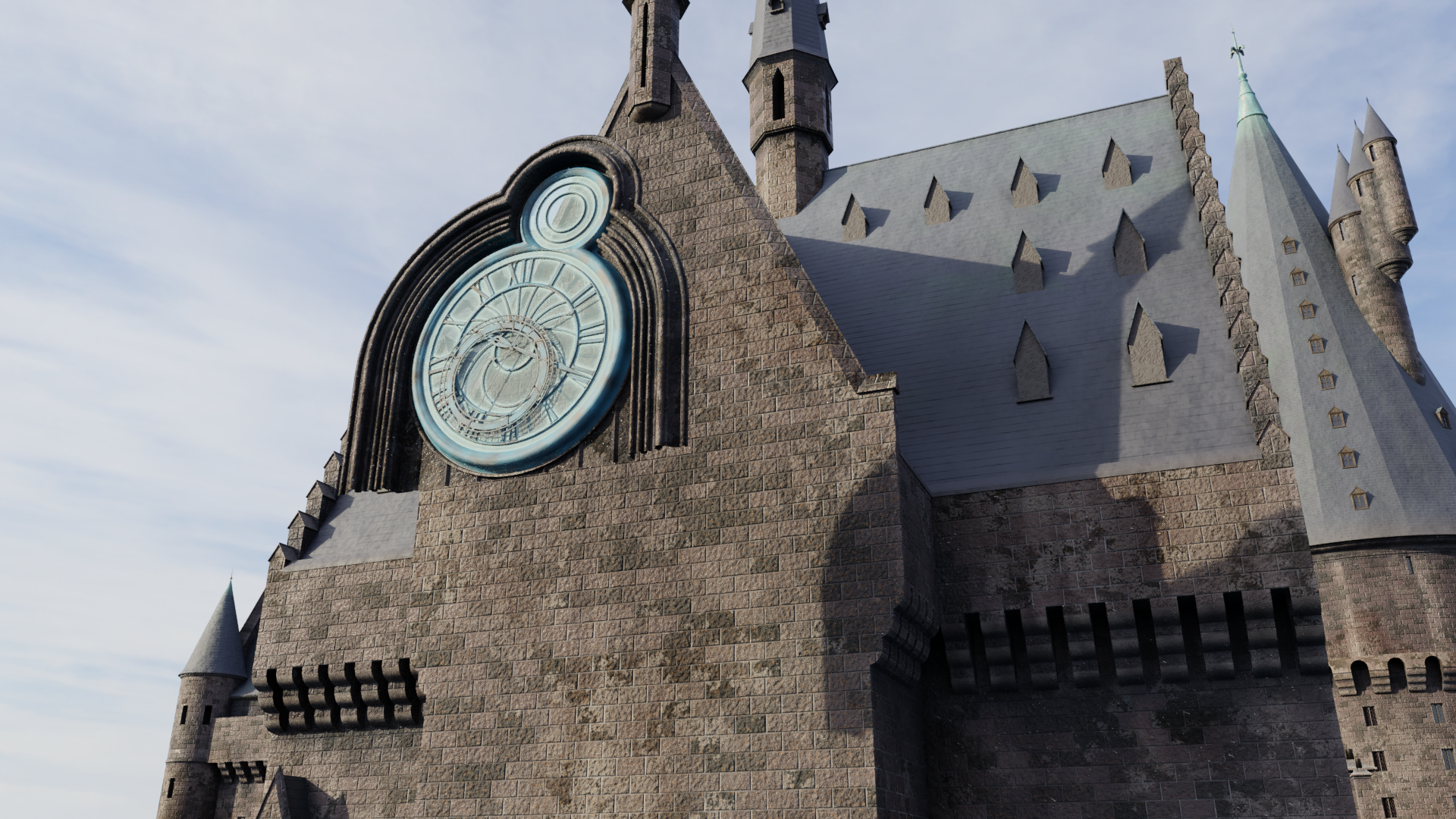
It’s worth mentioning that when it comes to the clock, the two differently-scaled miniatures and the full-scale practical element do have slight differences between them. Generally speaking, I’ve skewed toward the specific details seen in the larger miniature and the full-size version, but the level of detail is closer to the main 1:24 scale miniature. In other words, it’s missing the smallest bolts and grooves…this model isn’t intended to be examined SUPER up-close.

That brings us to the complete clock we saw earlier in the post. In addition to completing both faces, I added some basic gears back behind there; they probably won’t be visible 99% of the time, but perhaps they’ll give some visual hint of the inner workings we see in the film.
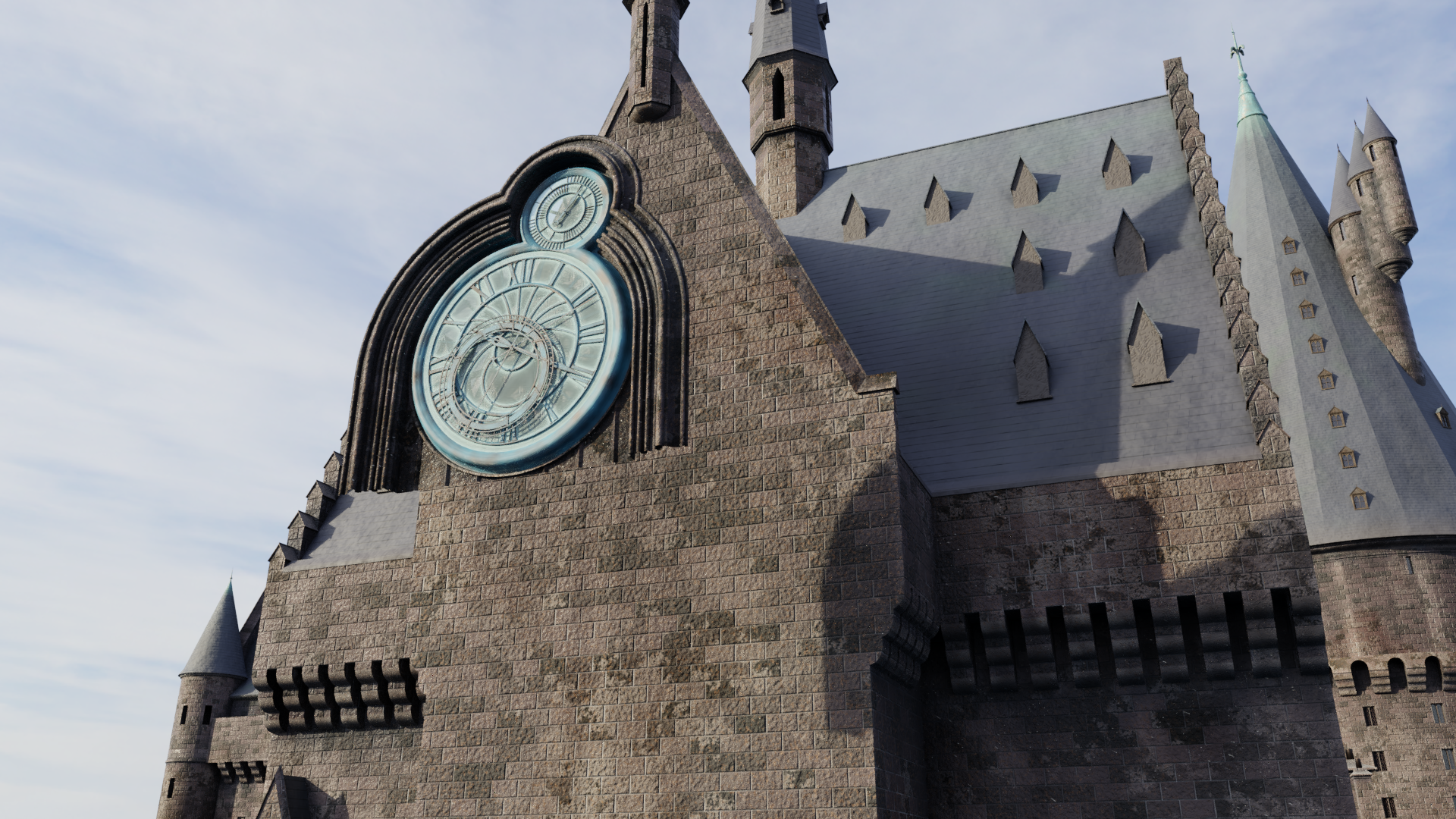
I’m not quite satisfied with the copper material, so I may go back and make some improvements at some point. But for now, I think the next step will be to build all the other detail on the front facade of the clock tower. There’s a lot – easily enough to fill up the next post. Be sure to follow for more updates!

Hogwarts Gets Its Steps In

I had a change of heart – rather than working on the textures or finishing the Prisoner of Azkaban clock tower, I decided to bite the bullet and just do my best with the original boathouse steps. I don’t have enough photographic coverage to be able to measure things out via photogrammetry, so I decided to just follow the floor plan and estimate the rise/run of the stairs.

The first step was to lay out the steps and landings themselves. This came together pretty quickly:

To my relief, the scale ended up being fairly reasonable. The next step was tougher…I had to create the walls along both sides of the steps, and they posed some challenges in terms of angles and intersections and whatnot. Halfway through, I started getting pretty annoyed…

The two circular landings were particularly difficult. But I stayed the course and eventually finished the walls, topping them off with the necessary flambeaux or torches. (Note that these walls are intentionally much taller than what you’ll see in the final model – the terrain will cover most of the height in most spots. I just wanted to make sure I had plenty to work with.)

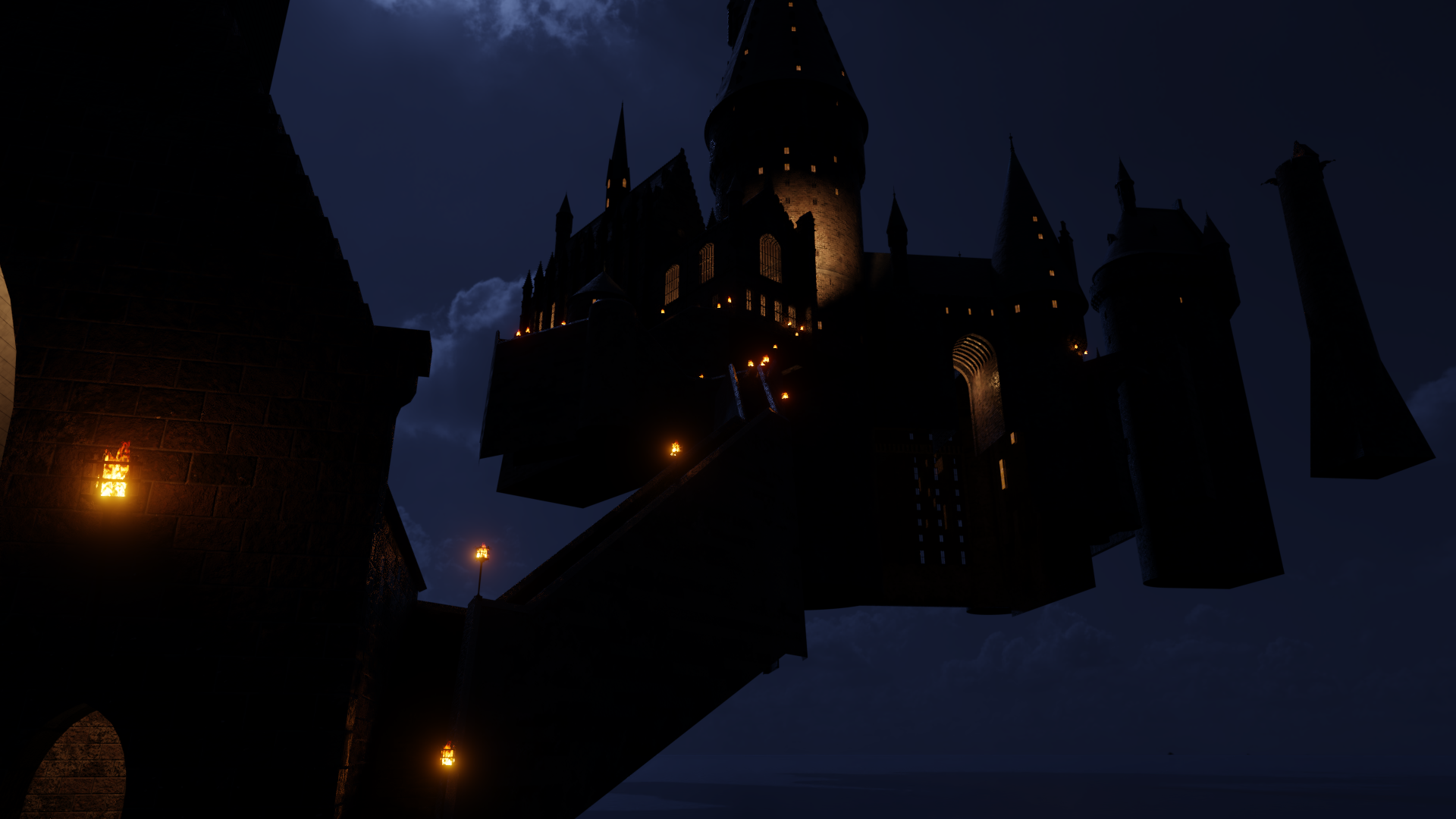
Whew…all done! Here are a few more views for you to enjoy, including a nighttime shot looking up from the boathouse. This would have been Harry’s view of the castle immediately after disembarking from the boats.

With the boathouse steps complete, I also threw in the crenellated walls around the Chamber of Reception walkway.

What’s next? I’m already assembling my reference materials for the clock tower and courtyard that were added in the third film. Lots of intricate details here, especially since so much of it was also built as a physical set. Should be fun to finally finish that area!

POA Model Progress: Link Building, Quad Building, & Stone Bridge

As promised, this post is a lot lighter on the technical details and a lot heavier on the images! Getting better reference images for the link building was a big win. (Again, that’s the tiny linkage between the Great Hall complex and the marble staircase tower.) I knew what it looked like after the third film, but the first three films had a different design for the link building and there are no good shots of it in the films. I had nearly given up on accurately reproducing it.

But now that’s all changed! Feast your eyes on the SS/COS/POA link building!

It’s the short wall toward the bottom right. Okay, so, not a big deal in the grand scheme of things, but hey, it’s nice to solve that mystery. (Now if only I could find a good shot of the adjacent wall of the Chamber of Reception…) I also discovered that the link building roof is in fact just the end of the Great Hall balcony. Check it out from above:

I never would have guessed! After the third film, the link building had its own separate roof and the Great Hall was lowered so the balcony wasn’t level with it.

The next step was to finally close off the front of the quad building, just to the right of the link building and the marble staircase tower. There’s always been this gaping hole right there in my model and it was a joy to simply add a wall there, let alone all the cool details on top of it. I also put the finial on top of the tower in the corner at long last; it had been sitting there all open-ended and weird-looking for almost a year!

I even added in the stone bridge, visible at the bottom right. For now, it doesn’t go anywhere, but it’ll ultimately become one of the three walking paths between the two halves of the castle. Here’s a closer shot:

I also did a nighttime render of the angle from before. This inspired me to do some more work on the castle’s nighttime lighting, deciding which windows would be lit based in part on screencaps from the films.

I couldn’t help myself – I had to position the camera down at the water level to mimic some of those first shots of the castle in Sorcerer’s Stone. Not gonna lie, I’m really digging this look.

Next steps? Haven’t decided just yet. I do still need to detail the clock tower and hospital wing, around the back side of the quad building…I also think I’m going to need to start doing a bit of manual texture painting on the castle to get the vertical streaking caused by rain and so forth over the years. Currently, the castle textures are 100% procedural – in other words, the software generates them by following complex rules I’ve set up – but that doesn’t seem to be cutting it with the vertical streaks. Fortunately, Blender allows us to mix and match, so I can keep the overall look procedural while just painting in the vertical streaks by hand. Maybe I’ll try that next.

Great Hall Balconies, Pepperpot, & Pre-DH Boathouse

Work continues on the Prisoner of Azkaban iteration of Hogwarts! I guess my return to the project might have legs.

(Forgive the exposed interior glow panels on the right again.)

With the Chamber of Reception complete, I moved on to the terraces or balconies surrounding the Great Hall, plus the foundations below. Good lord, the geometry of these corbels gave me a headache as I tried to reconcile a variety of imprecise measurements and calculations. I’m pretty happy with how they turned out, though. And I sure was thrilled when the spacings of the corbels and the torches lined up! I added the finishing touches to the pepperpot as well.

This also afforded the opportunity to check out some angles not seen in the films, such as this nighttime view looking toward the head of the Great Hall from the balcony outside:

Soon I was faced once again with that perennial question: what next? At first I considered doing the crenelations outside the Chamber of Reception and the steps down to the boathouse, but as I assembled reference images, I found myself drawn to the boathouse itself.

It’s a simple structure with a lot of good reference out there, since it never changed till the digital rebuild of the castle for Deathly Hallows (when it was completely redesigned), and visitors to the Warner Bros. Studio Tour can get quite close to that part of the model. As a result, it came together pretty quickly. Here it is in complete form:

I really like that last one. I wanted the boathouse to “pop” in front of the similarly-colored castle behind it, so I went with a shallow depth of field and ended up with this render that kinda looks like a miniature itself. You can even see the witch-and-black-cat weather vane at the top. And, as I mentioned last time, I finally got a decent stone floor texture going, though I’ll probably still tweak that some more.

Next up…the boathouse steps, I suppose? Speaking of which, it just occurred to me that the first-years have to climb the height of a 14-story building to get from the boathouse to the Great Hall for their Sorting. Between that and the nerves, it’s amazing they all manage to stay on their feet.

Chamber of Reception

For the first three Potter films, a large antechamber or entrance hall sat in front of the Great Hall. Its interior – the very first interior of Hogwarts seen on film – was shot on location at Christ Church Cathedral’s Great Staircase at Oxford. Stuart Craig and his team didn’t attempt to recreate the exterior of this structure in the visual effects miniature of Hogwarts, but the design they came up with does draw some details from that real-world location. Although this room is never explicitly named in the film, Harry’s prop acceptance letter instructs him to report to the “Chamber of Reception”, and the name (seen only briefly onscreen) seems to have stuck with the fan communities. The closest equivalent in the books is the entrance hall.

For Goblet of Fire, Hogwarts received a new courtyard and tower in front of the Great Hall, and the Chamber of Reception went the way of the dodo, never to return. In its place was an entrance hall with a smaller footprint and very different appearance. It’s a great look, but I’m very fond of the Chamber of Reception, due to my particular nostalgia for the first film. Fortunately, since I’m working on the Azkaban version of the castle, I get to include it in my model!

Getting the vertical dimensions of the Chamber of Reception required some use of photogrammetry and inference from known elevations of adjacent areas. Soon, I had a basic shape roughed in:

That chimney that protrudes from the corner on the right is a detail taken from the real thing at Oxford, by the way. Thanks, Google Maps:

The miniature also incorporates the exterior steps and the light fixture above the arch, even though there are no location shots of those in the film, leading me to believe that they at least considered shooting some stuff just outside this building at Oxford.

Anyway, I kept the same camera angle for the renders that followed. I began to block in the so-called pepperpot building on the left and added more details to Chamber of Reception:

The last round of details really brought it all together, completing the Chamber of Reception (other than some windows I may add to the far side). The tracery on the windows was tough, since reference for those is quite limited. I think what I came up with is pretty decent, even if it’s not 100% accurate. I also had to refer to the hammerbeam roof interior miniature from the first film for the rose window on the front of the Great Hall – I can’t find any closeup shots of the exterior, but there’s a corresponding rose window in the interior miniature.

I even included that real-world lamp above the arch, plus another Hogwarts-style sconce next it that’s visible on the effects miniature. They’re hard to see in the daylight, so…Nox!

There’s still more to be done here with the interior lighting, but I do like the way this is turning out. You’re actually seeing into the lit interior of the Chamber of Reception and Great Hall; most of the other windows in my model just have flat panels behind them that give off a splotchy orange glow for night shots, a cheat that’s very obvious in the exposed interiors seen to the right side of this render. But the Great Hall and Chamber of Reception have large windows into large spaces with known interior architecture, so I didn’t want to fake it with these.

I think I next need to add details to the pepperpot, and then either the link building or the terraces around the Great Hall. We’ll see what order I end up springing for. I’m also going to need to create a new texture for the paved horizontal surfaces like those terraces – so far I haven’t done anything like that.

Marble Staircase Tower, AKA Dumbledore’s Tower, AKA Turris Magnus

All right…as promised, it’s time for one of Hogwarts’ most recognizable exterior design features to go from simple block-in to fully detailed model. I’m talking, of course, about the marble staircase tower, also referred to as the turris magnus (on the Marauder’s Map) or Dumbledore’s tower. You can go all the way back to Stuart Craig’s original concept sketch for the Hogwarts exterior, and this tower is already there. It’s the biggest tower, the one on the left. A few of the details are slightly different than the final design, but it’s pretty close:

This thing is massive. To give you a sense of scale, in the real-world environment envisioned by the design team, the top is over 600 feet above lake level. The main body of the tower is 92 feet wide. The spire alone is over 200 feet tall, with somewhere around 50 feet of that being the enormous copper finial at the top. For my fellow Disneyland fans…the entire freakin’ Matterhorn would fit inside the spire. Near the top, that smaller triple turret on the left is Dumbledore’s office; the castle’s moving staircases sit below, inside the cylindrical body of the tower. Mr. Craig has readily acknowledged in interviews that there are design choices here that simply couldn’t be built in real life. Fortunately, magic covers many architectural sins, and personally, I think the films are all the better for it. The turris magnus is featured prominently in the very first shots of Hogwarts and it’s part of what made such an impression on me in the early 2000s.

The first detail I wanted to capture was the dormers sitting along the sides of the spire. This is where the ridiculous, over-the-top dragon chase in Goblet of Fire really came in handy, because Harry and the Hungarian Horntail end up on these rooftops, providing closeup miniature shots and even closer shots of a partial set for Daniel Radcliffe to interact with. I decided to incorporate all these details into the dormers, even though the main 1:24 scale miniature probably wasn’t quite this detailed. (The closeup shots were accomplished with other bespoke miniatures on larger scales.)

Let’s also pull back for a wider shot, including some detail work on the finial and the beginnings of work on Dumbledore’s office:

(By the way, sorry for that other spire near the bottom middle, the one that has the copper patina discoloration near the top but no finial. Keeps showing up in renders. Eventually I’ll add the finial, I promise!)

Next came the stepped corbelling at the base of the turrets of Dumbledore’s office, and their own much smaller spires began to take shape as well. This was all slightly complicated by the fact that what few technical drawings I could find were not quite accurate, but I think I got pretty close in the end.

Here’s where I ran into a conundrum, though. As I mentioned, the closeup shots in GOF were accomplished with larger miniatures built just for those shots. As I looked more closely, I realized that the design of these turrets is a little different in these miniatures than in the main miniature – mainly in the design and placement of the windows. I couldn’t decide at first whether to go with the more detailed alternate design seen in GOF (and the theme park versions) or just go off of the main 1:24 model. The former was tempting at first, since the changes were clearly done to help the exterior match the interior sets designed for Chamber of Secrets. Speaking of which, as massive as this whole tower is, Dumbledore’s office is actually still smaller than the actual set. I thought that was pretty interesting. Below is a very simplified version of the interior set (in white) next to the exterior, using the real-world scale of the set and the intended imaginary scale of the exterior. (The vertical protrusions on the right are where the windows are; they didn’t build the sets with full-thickness walls, so they look like they’re sticking out.)

Anyway, the main model’s design won out in the end, and you can see the corresponding simple window designs have been added here. I’m technically still working on the POA version, and the redesigned exterior wasn’t created till GOF; when I get to GOF, I’m sure I’ll build the redesigned version too.

That makes the spire more or less complete, although I may go back in and add in details like roof flashing where Dumbledore’s turrets meet the main spire. For now, I moved on to the main body of the tower, adding corbels and windows:

From there, it was just a matter of building the larger windows that cover the rest of the tower below! In studying my 16,000-pixel-tall collage of reference images for this tower, I noticed that the spire has actually been mounted on the tower at a variety of angles over time, and there were again some discrepancies between the actual model and the technical drawings. This made it harder to figure out the radial spacing of the windows, but in the end, I did some measurements on my old photogrammetry of the castle and settled on there being 18 windows on each floor. Hopefully that’s correct, haha. In any case, here’s the complete tower!

As I continue around this corner of the castle, we’ll next be proceeding to the only other feature that’s as visually important as the marble staircase tower: the Great Hall!

POA Hogwarts – South Wall of Quad Building

Still focusing exclusively on the Prisoner of Azkaban version of the castle. I’ve continued working my way counterclockwise (anticlockwise, to Harry and his Brit friends) around the quad building. The south wall is now complete.

If some of this architecture looks pretty unfamiliar, there’s a good reason for that: you never get a good look at this wall in the films, at least in this design iteration. Finding adequate references for the buttresses and the arch-shaped depression was quite a challenge, and there’s still a bit of guesswork on some of the details, but it should be pretty accurate. The tracery on the windows between the buttresses was particularly tough…there are no closeup shots of these that I can find anywhere, and they vanished in OOTP, so it’s not like you can go photograph them on the miniature in the Warner Bros. Studio Tour. But I lucked out and discovered that the same window design was used inside the quad (AKA paved courtyard) in the OOTP video game, and that provided some good reference. (Speaking of windows, the windows in this render really show how hollow the quad building is right now. Eventually, I’ll have everything filled in so you’re not looking straight through from one side of the building to the other.)

It’s a short post for today, but that’s just because I want to be able to devote the next post to the major element I’m working on this evening: the castle’s main tower, variously known as the marble staircase tower, the turris magnus, or Dumbledore’s tower. I’ve had a very simple version of the tower in there since the start of the model, but now it’s time to get all the details in there. More soon!

Night Falls on Hogwarts

I liked that fire material from the last post so much that I kept finding myself virtually lighting the torches and switching to that day-for-night setup. Eventually, I got wise and decided to create a dedicated “night mode” for the model. It has a different HDRI for the background (a cloudy daytime scene from HDRIhaven.com that I made much darker and bluer), stylized blue lighting to match the moonlit shots in the first couple films, and interior lights behind some of the windows. Compare:

Best of all, I realized I could use Blender’s node group functionality to create a single slider that would allow me to change all the different settings between day and night simultaneously. I also did the same for the two color modes (the warmer look of the first two films, and the desaturated look of the later films, seen above).

Both tasks were made easier by some behind-the-scenes organizing I’d been doing. The procedural (algorithmic) brick texture on all the walls had gotten really complicated, because I was layering so many different elements together in the pursuit of a realistic and visually pleasing result. For kicks, I thought I’d share what the brick material’s node tree looked like before:

Each of those little gray boxes (nodes) is a set of calculations, receiving inputs and sending outputs via those light gray lines that connect them to other nodes. I’d organized them into those colorful groups, each of which has a descriptive label, but it was still a pretty ugly setup and not that easy to use or “read.” Here’s the same material after visually organizing the node tree a little better:

Not only does this look cooler, but it’s a lot easier for me to just jump in and make changes or additions where needed. (Which I’ve already done repeatedly since taking that screenshot…the setup is even more complicated now, but still nicely organized.)

You might have noticed that long wall at the bottom right of day/night renders, connected to a small tower. These new additions will barely be seen in the final version of the POA model – they were part of the original model from the first film, but starting in Azkaban, the landscape became much hillier and it literally swallowed up most of the wall and the entirety of that tower. But I decided to build the whole thing now so that it would be easier to create the versions for the first two films when the time comes. Here’s another shot:

There’s also some work happening here on that wall beneath the hospital wing bridge, just to the right of Gryffindor Tower in this image. Here, let’s take a closer look with the clock tower and hospital wing temporarily hidden, and some improved texturing on the roofs and spires:

Windows, dormers, drainpipes, corbels, the whole nine yards. That wall is done now, and you can even see some work happening on the tower on the right. Fast-forward a bit, and here’s a closeup of that tower, now complete as well:

Some of this geometry was definitely tricky to get right, but it was worth it in the end. I also had a lot of fun with the decorative elements near the top – there’s a triquetra near the top of each dormer, plus some sort of decorative plaque just below. I couldn’t quite figure out what is embossed in the plaque, so I just sculpted something that looked similar and baked it as a normal map. [EDIT 4/24/19: I finally found a clear enough photo of the plaque – it’s the Hufflepuff crest! Guess I’ll have to go in and redo it at some point…] You can also see the new diamond-shaped muntins in the windows, which are now in all the windows of the castle so far. (I admit that I didn’t go procedural with these…I briefly tried, but it just seemed more efficient to use a single diamond image that I could tile all over the glass.)

Taking a closer look, though, the roof shingles aren’t supposed to get flattened out in some places like that. Always more to be done!

Fixed Vertical Scale, POA Training Ground Entrance, & Hogwarts Torch Sconces

Okay, I might have overreacted a little bit. The vertical scale issue didn’t take that much work to remedy; I forgot how relatively little I’ve modeled so far. A 5% increase in height got everything back on track, although I had to be careful with a few shapes that needed to stay perfectly circular or perfectly square. Here’s how the results look:

…yeah, pretty much the same as before. Hey, it’s only 5%. But this small fix will help ensure that all the different structures line up correctly as I continue to build.

Hippogriff-eyed viewers might notice the addition of the so-called training grounds entrance, just to the right of the DADA tower. I say “so-called” because it stopped being an actual entrance after Chamber of Secrets. Originally, this small cubical building connected to the suspension bridge on one side and the training grounds on the other. But then the suspension bridge moved in Azkaban, turning this building into a dead end that could only be accessed from inside the training grounds. It never changed back. Still, this seems to be the name that the fan communities are using, so I’ll roll with it. (Except for in the internal layer organization of the model, where I stubbornly refer to it as “small cubical building.”)

While you’re taking a peek at this modest addition to the model, you might also notice the torches burning on either side of the archway. I’d been meaning to model the black wrought iron sconces seen in numerous exterior shots, and this was the perfect chance. As always, I started without texturing:

As I worked on this, I noticed that the bowl of the sconce was always empty in daytime shots, but always full of visible firewood (?) when the fires are lit at night. I’m taking a similar approach. Here’s a classic day-for-night shot of the torch by Sirius’s cell atop the dark tower, created by significantly reducing the brightness of the daytime background HDRI:

I’m rather proud of the simple little fire material I created, too. It’s a volumetric shader applied to a roughly conical shape, with black firewood shapes down in the base. The 3D texture that simulates the characteristic shapes of the flames is tied to the world coordinates, not the local coordinates of the individual fire object, which means I can duplicate the exact same torch and fire objects but still get a unique pattern of flames on each one – very important in areas where multiple torches are in close proximity. Then, when switching back to daytime renders, all I have to do is rewire a couple of nodes to hide all the firewood and flames across the entire model.

The one thing I didn’t like about this render was that some areas of the stone bricks are just too smooth, though. So I went back in and beefed up the normal maps that simulate the rough, bumpy surface texture. If you look closely, you can see a bit of it in this last render of the training grounds entrance, though I’ll probably keep tweaking it as I continue. (Also, I forgot to un-hide the lake surface below for this render, so you’re just seeing the photographic bottom of the HDRI background. Whoops.)

One last thing I keep forgetting to mention: If some of these buildings in this model look like they start too low or are too tall, that’s just because the surrounding terrain will cover most of the base areas. Because the terrain is so uneven, there are lower areas that get exposed here and there, and my model already includes those lower areas. Once I’ve got the ground and the hills and the ravines in there, it’ll look a lot more…Hogwartsy.

More POA Hogwarts Texturing

Well, so much for turning the materials off and focusing on the modeling again! The process of creating and tweaking and refining these textures has become a bit addictive.

Here I’ve created a shingle texture for the roofs and spires. The finials have also received a copper patina treatment to match what we see in the films. (Again, no image textures here – all procedural.) Less obvious are some subtle adjustments to the brick texture. Notice how the bricks no longer appear to be all perfectly flush with each other – some stick out slightly further, like you’d see in real medieval construction. There were still more tweaks needed, though. In particular, I wanted more vertical streaks to mimic dirt deposits from years of rain and weather. Those are quite noticeable on the “real thing.” Many hours later…

…that’s more like it! Still not perfect, but I don’t think I’ll be able to convince current versions of Blender to do any more on their own. I could paint the streaks in myself, but I’m still really trying to stay procedural so that when I build the rest of the castle, the brickwork and weathering and dirt patterns will all just magically appear without any further work. (Unrelated, but you can also see a few contour lines down near the shoreline. Once these are completed, they’ll act as a guide for me to sculpt the landscape the castle sits on.)

If it’s been a while since you’ve seen the first couple of Harry Potter films, you might be thinking that this castle looks awful colorful. Were the bricks really that red, the roofs really that bluish? Well…yes, at first. The Hogwarts we see in Sorcerer’s Stone and Chamber of Secrets has pretty saturated colors. Here’s a frame from the latter, for instance:

It was really only once we got to Prisoner of Azkaban that the colors took a turn for the grayish green. At least part of it was just color grading on the film; it’s hard to tell if the miniature itself received a cooler paint job, but if it did, it wasn’t as dramatic a difference as it appears in the film:

That’s more or less the color scheme we see through the rest of the series, and the theme park versions at the various Universal resorts don’t stray far from this look. So despite my original intention to just get the original look of the model, I created an alternate coloration for the model, too:

It’s still not as green as what we often see after the first couple films, but it’s at least closer. I set up the material nodes in Blender so I can quickly switch between color schemes across the whole model; I suppose I’ll probably stick with this coloration while I continue work on the POA version, but the more colorful version will be ready to go when I start working on the castles of the first two films.

I’ll round out this post with kind of a cool, different shot of the castle in silhouette. You can see I’ve finished the windows on the Defense Against the Dark Arts tower, although I discovered a small mistake in the lowest row of windows after this render was made. Unfortunately, this angle also highlights some of the areas where the bricks don’t map quite right onto the forms of the castle. After a lot of experimenting, I’m starting to think this may be as good as the mapping is going to get. But who knows?