Something different today! By request, I’ve documented my 3D modeling process with a sped-up screen capture. (You’re welcome, Pete!) Watch me work on the area that corresponds to the transepts of Durham Cathedral, as well as the Prisoner of Azkaban version of the central tower. I’ve tried to keep the commentary relevant no matter whether you’re a fellow Blender user or not.
If you’re interested in more videos like this, comment here or on the video to let me know! They take some extra work but I can do more if there’s enough demand. Don’t forget to subscribe to the YouTube channel too!
Here are a few renders of the progress seen in the video. As always, click for larger versions:
After finishing the video, I put the last few touches on the central tower:
With the SS/COS grand staircase side project complete, let’s hop back over to the main model!
The basic layout of Hogwarts in all the films is divided into two halves – a wing to the south where you have things like the Great Hall and the marble staircase tower and Gryffindor Tower, and a north wing that’s largely based off of real-world architecture at Durham Cathedral and Alnwick Castle. There are three footpaths that connect these halves:
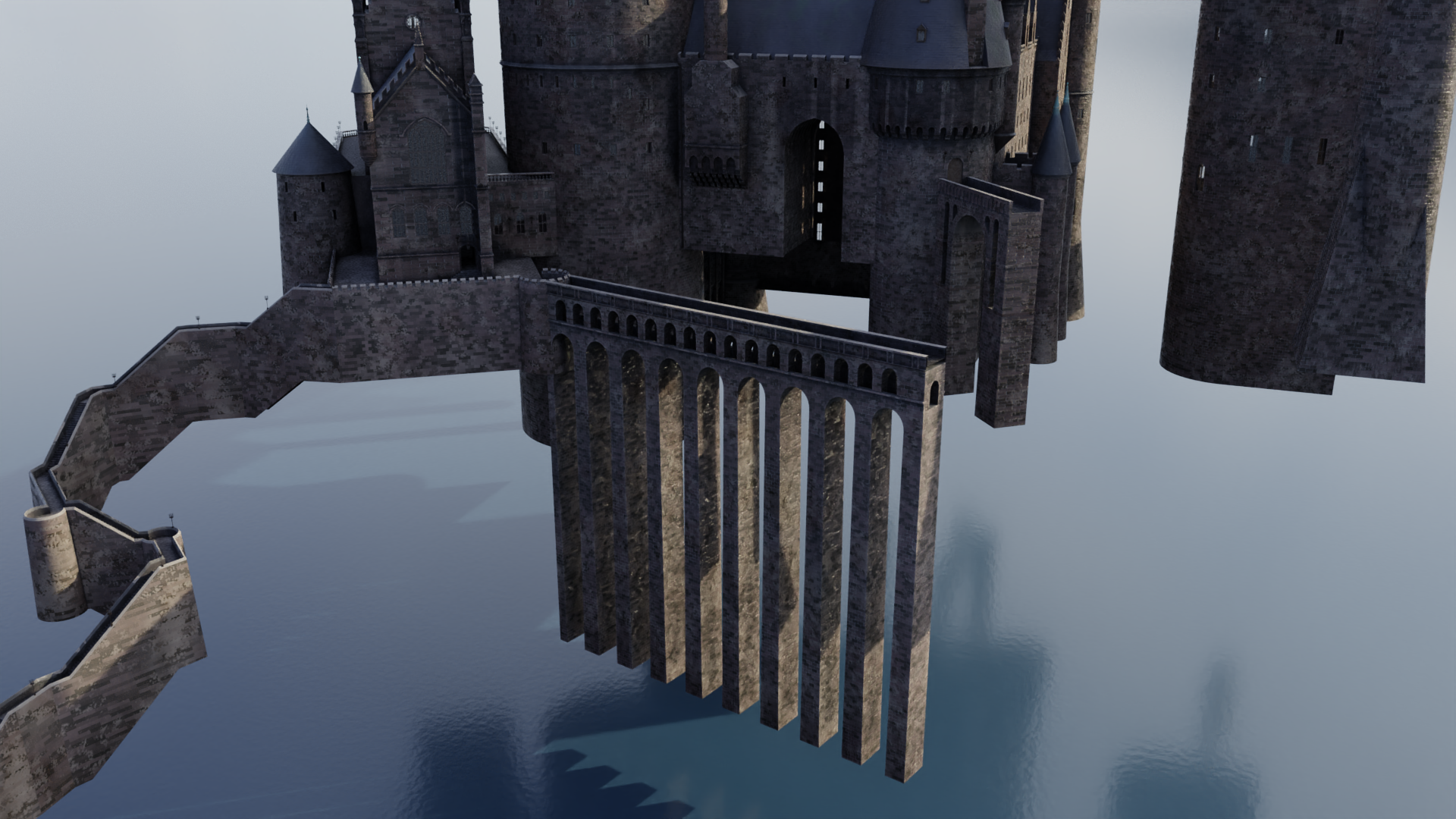
The viaduct, which is by far the most noticeable, as it’s the largest and it’s situated right out front. This one goes all the way back to Stuart Craig’s early concept designs, and it stayed virtually unchanged all the way till Deathly Hallows, when it was enlarged and reoriented to become the main route into the school. (A new stairway was added so that there were still three paths connecting the halves of the castle.)
The stone bridge, which is much shorter and rather higher up than the viaduct, but still quite visible. It also dates back to the early concept art.
The suspension bridge, which isn’t seen particularly often but remained more or less unchanged throughout the films; it just moved around a little.
Each of these was in a different state in my model: the viaduct didn’t exist at all, the stone bridge was complete, and the suspension bridge existed as an early attempt that I hid sometime last year. I decided to hold off on that till later, but I did need to get the viaduct in place so I could start work on the north wing!
There’s a lot of good reference out there, so the viaduct wasn’t particularly difficult:
You may notice I’ve begun adding some subtle atmospheric perspective or mist to some of these renders…it can really help provide some depth and separation, particularly since the entire castle is pretty homogeneous in terms of color and texture. That’s becoming more important as the castle continues to sprawl further and further out.
Anyway, with the viaduct completed, I turned my sights to the so-called viaduct entrance – as in, the entrance to the north wing from the viaduct, not the entrance to the viaduct. It’s framed by two towers that remained largely unchanged throughout the films; their spires just got a little steeper in Order of the Phoenix. They also added a window to Snape’s dungeon at the base of the one to the left, but that’s hidden from a lot of angles…and since I’m working on the Azkaban version of the castle right now, I don’t have to worry about that yet anyway.
I began adding the left tower, as well as the semicircular area at the end of the viaduct. This is also a nice silhouette of the stone bridge in the background:
Once the details started really coming together, including the shallower spires seen prior to OOTP, I mirrored the left tower to the right side as well. (The two are identical, other than the fact that one of the windows on the left tower is replaced by a door to the stone bridge.)
Here they are complete!
That smoke sim is paying dividends…I’m really digging in in this render.
The wall that connects these two towers is interesting. It forms the southernmost face of the so-called long gallery, sometimes even just referred to as the Durham building because as I said, so much of its design is based off of Durham Cathedral. That cathedral was a real-world filming location for the first two films, and there are some areas of the miniature that follow its design pretty slavishly so as to meld well with the location shoots.
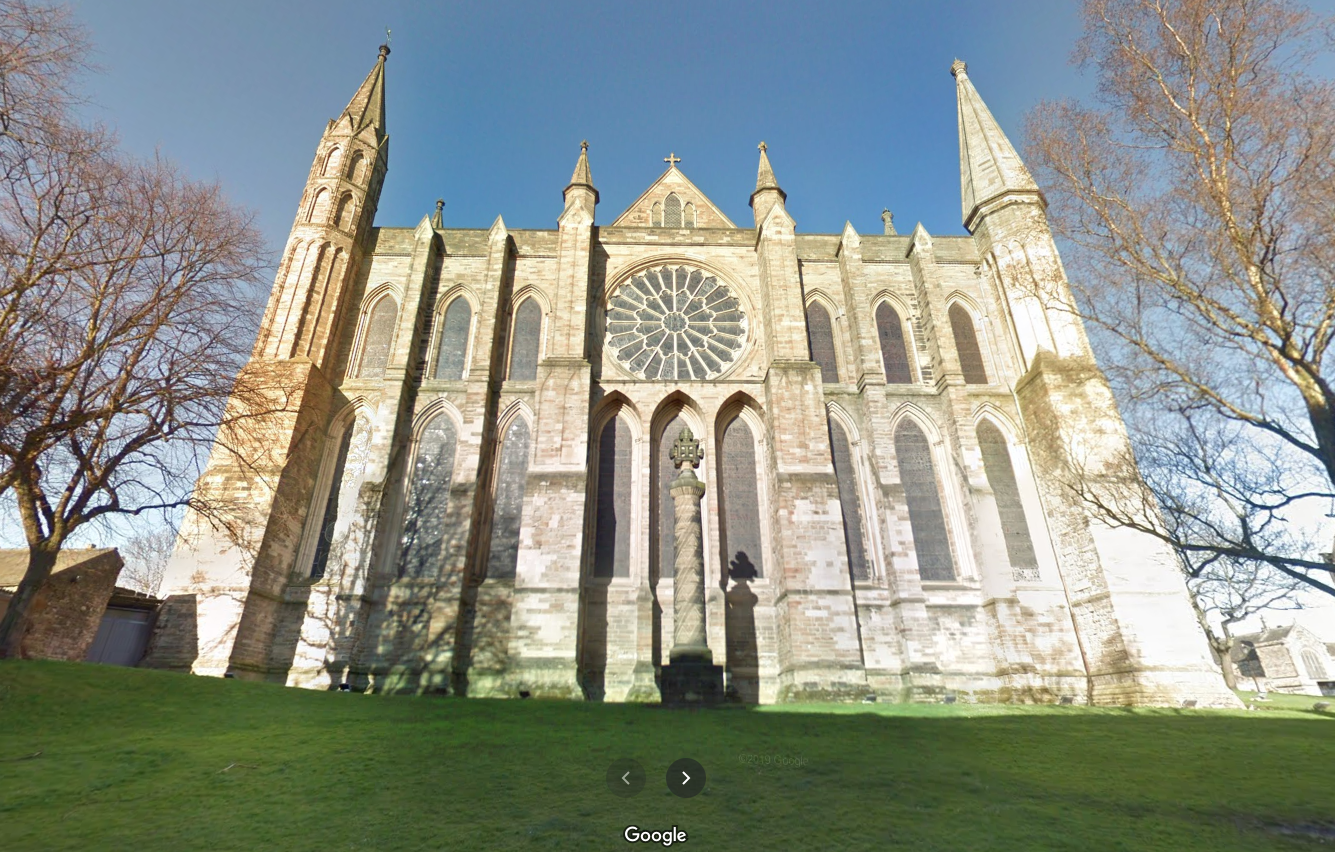
This south wall, though, corresponds to an area of Durham never seen in the film. This what it looks like in real life, courtesy Google Street View:
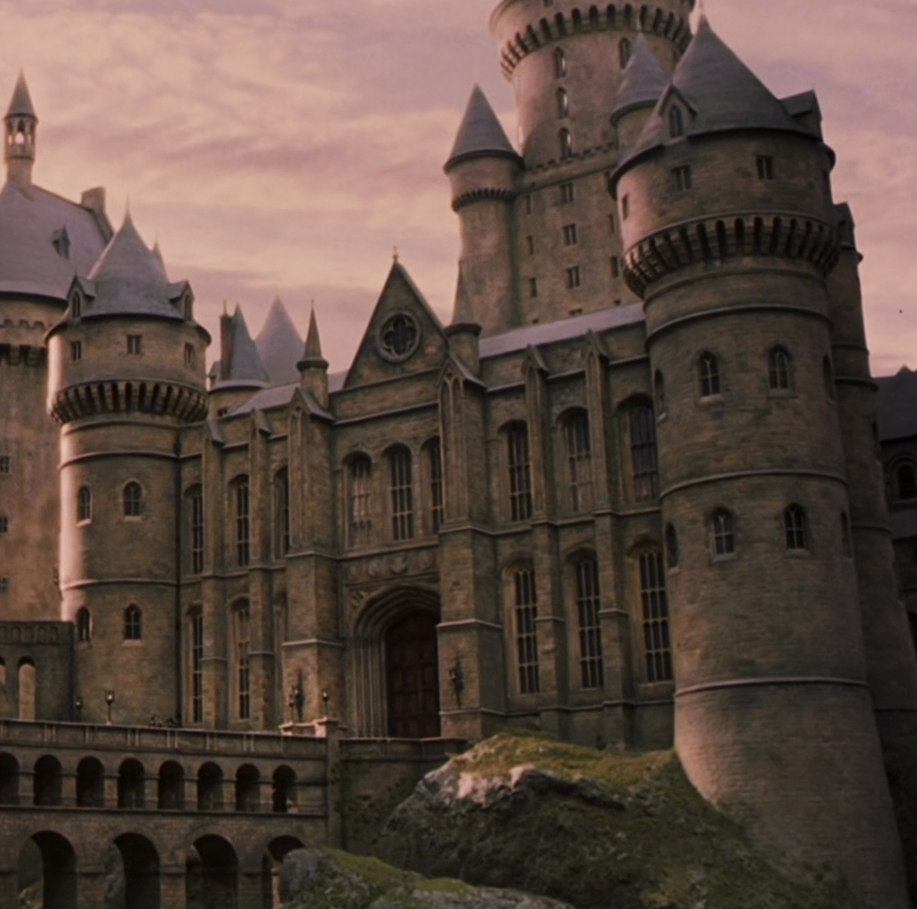
Since they never shot any scenes right here, there was freedom to modify the design for the visual effects miniature, which looks like this:
As you can see, the miniature retains the overall shape and dimensions, but many of the details have been changed. The large rose window is replaced with a much smaller and less “churchy” version, and front doors have been added – front doors that are identical to the doors to the Great Hall, which are in turn identical to real-world doors at Christ Church at Oxford. (The doors are, however, scaled up to about twice the size – nearly 30 feet tall in the imagined real-world scale the miniature represents!) The windows are very Oxfordesque as well.
Anyway, I began adding this south wall:
I didn’t have to create those huge Oxford doors completely from scratch this time…the archways in the grand staircase side project are variations thereof, so I was able to bring one of those archways into this file and modify it appropriately. (I admit it’s kind of a hodgepodge of super-precise areas and others that are merely close to correct…ssshhh, don’t tell anyone.)
I then added the four house crests – plus the main Hogwarts crest – above the door, using bump maps to simulate the relief. Here’s a student’s-eye view from the viaduct:
It’s especially nice now that I remembered to make the windows visible! Ignore the light under the doors though.
I don’t know why I was psyching myself out prior to starting the viaduct entrance…I had this weird gut feeling that it wasn’t going to look right, or I wouldn’t be able to get the dimensions to all agree with each other, or something…but I really like the way this is turning out! Stay tuned for more updates as I add windows, the triangular area with the small rose window, and the two small spires on either side!
As we’ve seen, POA featured some significant additions to the castle’s architecture, many of which were anchored by the new clock tower in the southwest corner. The last remaining piece of this section was the small gatehouse at the end of the wooden bridge. This came together easily; the only real question was how big to make the torch, since its size (relative to the building) differs significantly between the miniature and the full-sized set built at Glencoe. I ended up using the same scale as some of the castle’s other torches, which resulted in me kinda splitting the difference between the two sizes.
Believe it or not, that brings the POA additions to something of a complete state!
The south wing as a whole is still not complete, since I haven’t touched the quad interior due to scarcity of reference material. I also still need to add the walkway that connects the Chamber of Reception to the quad, but I’m holding off for the same reason.
Knowing this, I decided it was just about time to turn my attention to the castle’s north wing, much of which is derived from Durham Cathedral and Alnwick Castle. There were just a few odds ‘n’ ends to finish up first, like the fleur-de-lis pattern at the back of the Great Hall (bottom right):
Another miscellaneous item was the tree in the clock tower courtyard where Buckbeak’s executioner sits to sharpen his blade. It was fun creating its forking, branching paths by hand, following what we see in the film for the trunk and larger branches, then just going crazy with the smaller branches. I allowed Blender’s Skin modifier to bulk it all out into a basic three-dimensional form:
Whoops…I realized I’d forgotten to add the steps leading up from the courtyard to the wooden bridge. I added those, sculpted a bit more detail into the tree trunk, and used a particle system to add some leaves.
Next came ivy to help the courtyard feel a little more overgrown and wild:
I also spent some time grappling with Blender’s Mantaflow fluid simulation engine, trying to get convincing smoke to furl from the castle’s chimneys. It took the better part of a day for me to figure out that my baking errors stemmed from an apostrophe in the cache folder path (a folder descriptively named “Joe’s Stuff”). With that finally resolved, I was able to get some smoke in there:
After all the frustration, I really like how it turned out! I think that’s a nice note upon which to end the work on the south wing, at least till I can find more reference for the POA-era quad. Next we turn to the north wing, starting with the Durham section!
Short post today. I finished the clock tower! The only two pieces I still needed to add were the big window in back and the enormous pendulum that hangs down through the entry. Both are now in place! (I’d avoided the window for ages because I couldn’t find a clear shot of the tracery. Then I randomly came across a shot of a window at King’s College Chapel and realized that it was the exact same design. Problem solved!)
Around the other side of the building, I’ve been really hesitant to finish the hospital wing because the placement of the detailing toward the bottom will depend on the detailing of the surrounding quad walls, and I haven’t been able to add those due to insufficient reference. But I bit the bullet and at least took care of the top section:
I’ll still need to add the windows and so forth down below once I’m able to complete the quad. In the meantime, I’m gearing up to probably tackle the (gulp!) wooden bridge next.
Let’s return to the clock tower courtyard. With the fountain in the center finished, I decided to now enclose it with the courtyard itself. Existing as a full-scale set and as miniatures at 1:24 and 1:10 scales, the courtyard was designed for the third Potter film and is surrounded by aged cloisters and overgrown vegetation. There’s a lot of complex geometry to capture. I compared photogrammetry, production stills, technical drawings, film frames, shots from the Warner Bros. Studio Tour, the similar courtyard in front of the castle in films 4-6, the larger version thereof in the final film, etc., etc. Eventually, I felt like I had a decent understanding of the space.
One thing I’d never noticed before was that there are actually two different designs to the arched tracery of the cloisters:
The one on the right is taken directly from Durham Cathedral, lending stylistic unity with the location shoots from the first two films. I’m not sure if the one on the left is taken from a real-world location, but it’s certainly very similar to a lot of real Gothic tracery out there. That one is used primarily in the sections of these cloisters without a roof.
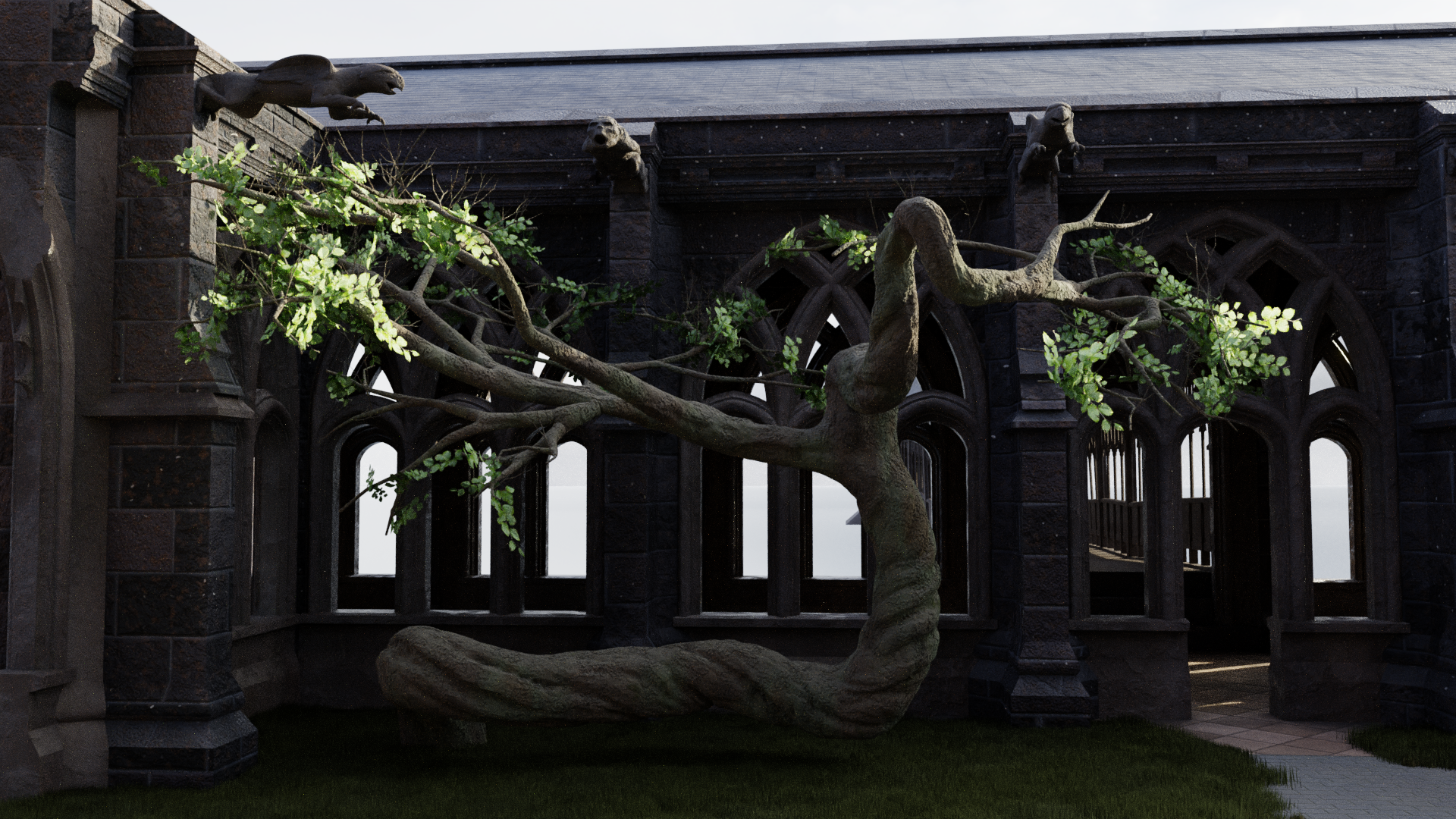
As with the fountain, my first task was to create the courtyard in a more-or-less pristine state, without any of the damage or erosion to be added later. (Adding the ground is a logical last step so I don’t have to worry about it blocking my view of the blueprints beneath the model.) Notice how the last arch on the right has the Durham tracery design:
The courtyard has elongated gargoyles placed at intervals around its interior, and while they look similar, there are actually two designs that alternate: a hippogriff and a centaur, although they’re so stylized that I had to study them for a while to figure out what they were depicting.
When they repurposed the clock tower courtyard set for the viaduct courtyard after Prisoner of Azkaban, they kept these gargoyles in place, providing a lot more visual reference. (Interestingly, while the gargoyles also made it into the larger version of the viaduct courtyard for Deathly Hallows, their features are much more sharply defined and less eroded in this version. I decided to split the difference for the purposes of my model.)
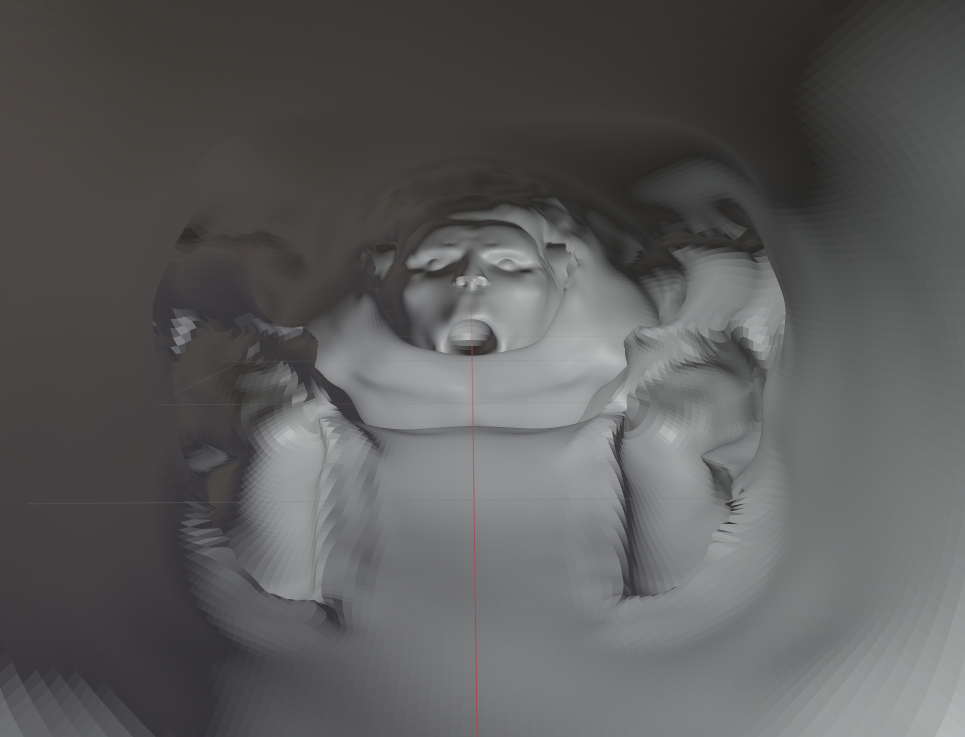
For the centaur design, I even had the benefit of a pretty accurate orthographic drawing published in The Art of Harry Potter. I based my Blender sculpt on that drawing and then baked a normal map onto a simplified version, much like I did for the fountain statues, although I didn’t bother with manual retopology – I knew this guy would never need to be rigged, posed, or animated, so I just let the Remesh modifier take care of the simplified topology for me. Anyway, you’ve already seen me go through this with the fountain statues, so instead of boring you with similar images, I’ll share this unique WIP view of the centaur sculpt from the inside:
Enjoy your nightmares.
Anyway, here’s the completed centaur design in situ, with some procedural noise layered onto the normal map baked from the sculpt:
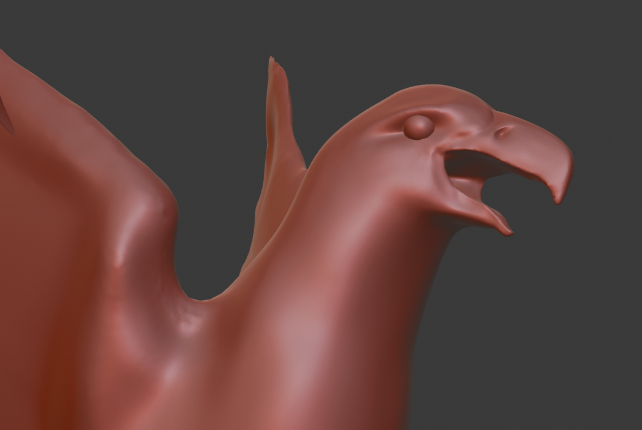
I made the mistake of not putting much work into the base mesh before sculpting this guy, so there were some areas of the sculpt that got dicey. The hippogriff fared better because I took the time to create a proper base mesh, like I had with the eagle sculpt. See, what a cutie! (I didn’t have original ortho drawings for this one, so I was wingin’ it. Heh.)
I tried to again use the Remesh modifier for my lower-poly version, but it didn’t work as well on this fella. Sharp parts like the beak and claws did not work well at all. Back to manual retopology! Oh well, it’s good practice, and a good opportunity to improve upon some of the poor topology on the eagle statue. My brain is not wired to easily just throw down perfect edge loops.
By the way, if the term “normal map” doesn’t mean anything to you, here’s what the one for the hippogriff gargoyle looks like:
The different colors essentially tell the software to pretend the surfaces point in slightly different directions than they actually do, thereby simulating details that aren’t actually there. Blender “bakes” these maps by comparing the surface of the simplified mesh to the original sculpt.
Here’s the end result:
The tricky thing with this one is that the front legs seem to have fallen off many of the gargoyles in the clock tower courtyard and the original viaduct courtyard, but the ones in the larger Deathly Hallows viaduct courtyard are intact. I think I’m just gonna keep the legs for the time being.
Here’s where we’ll leave off for today. In a future post, we’ll build the remaining walls of the courtyard and damage the appropriate areas.
When we last visited the statue of a certain golden eagle gobbling up a certain rattlesnake from a certain courtyard in the third Harry Potter film, I’d created a base mesh for the initial sculpt in a separate file…
…but I’d temporarily given up when the flight feathers proved more challenging than I’d expected. Although I didn’t share this last time, I’d actually gotten the head off to a decent start, especially for an artist who doesn’t do much sculpting:
But those dang wings were confounding me. Sculpting them was giving results that were messy and uneven, so I decided to try modeling each feather as its own mesh. This seemed more promising, but I still couldn’t get the feathers to “flow” nicely. They have a lovely sweeping three-dimensional curve to them in the film and I wanted to capture that.
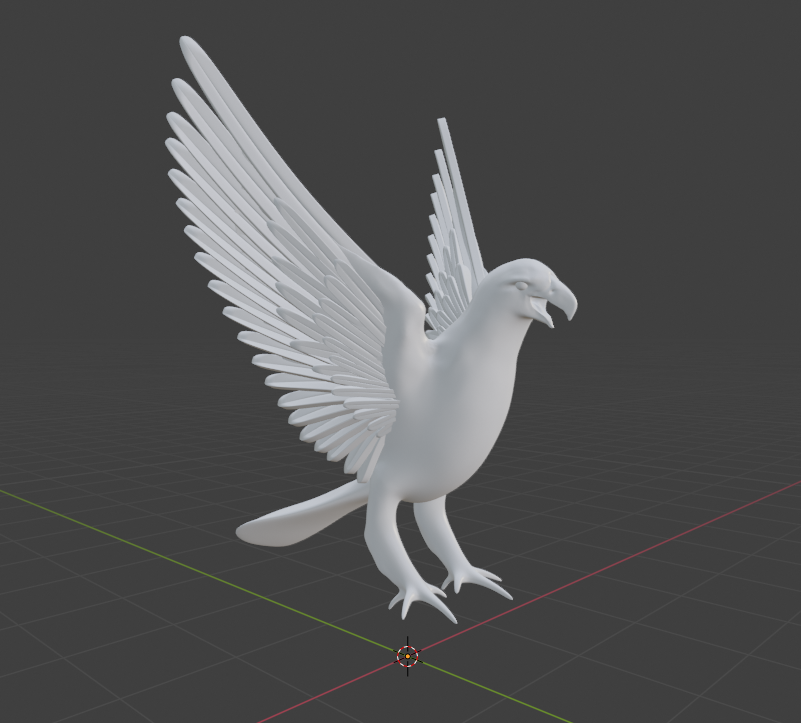
After taking a few days off to stew over this frustrating problem, the right method became apparent. I created four different feather shapes/rotations/positions (absolute shape keys, for my fellow Blenderheads) and allowed Blender to…well, blend between them. After playing with them for a while, I finally arrived at a result I could feel good about:
I’m sure there’s an ornithologist somewhere out there having a heart attack over the anatomical tomfoolery on display here, but whatevs. At a certain point, I have to remind myself that this statue is just a tiny part of a much larger just-for-fun model – and only certain versions thereof, at that. It’s not lost on me that I’m putting more effort into this statue than is really necessary for the purposes of this project, but I view it as an opportunity to learn and practice organic modeling skills that I’ve tended to neglect.
Anyway, I began creating some basic materials and threw in a background HDRI for lighting. The same shape key technique worked for the tail feathers…
…but not for the finer, more textural plumage on the body. So I used Materialize (another piece of freeware) to help me create a textured sculpting brush from photography of real eagle feathers. Back in Blender, I used this brush to directionally “paint” three-dimensional feathers along the body. This gave me a great base texture; I reshaped parts of it by hand to create more convincing layers of feathers. Should be good enough, considering that this will mostly be seen from further distances.
I thought the legs and feet were going to be hard, but they actually turned out to be a lot of fun:
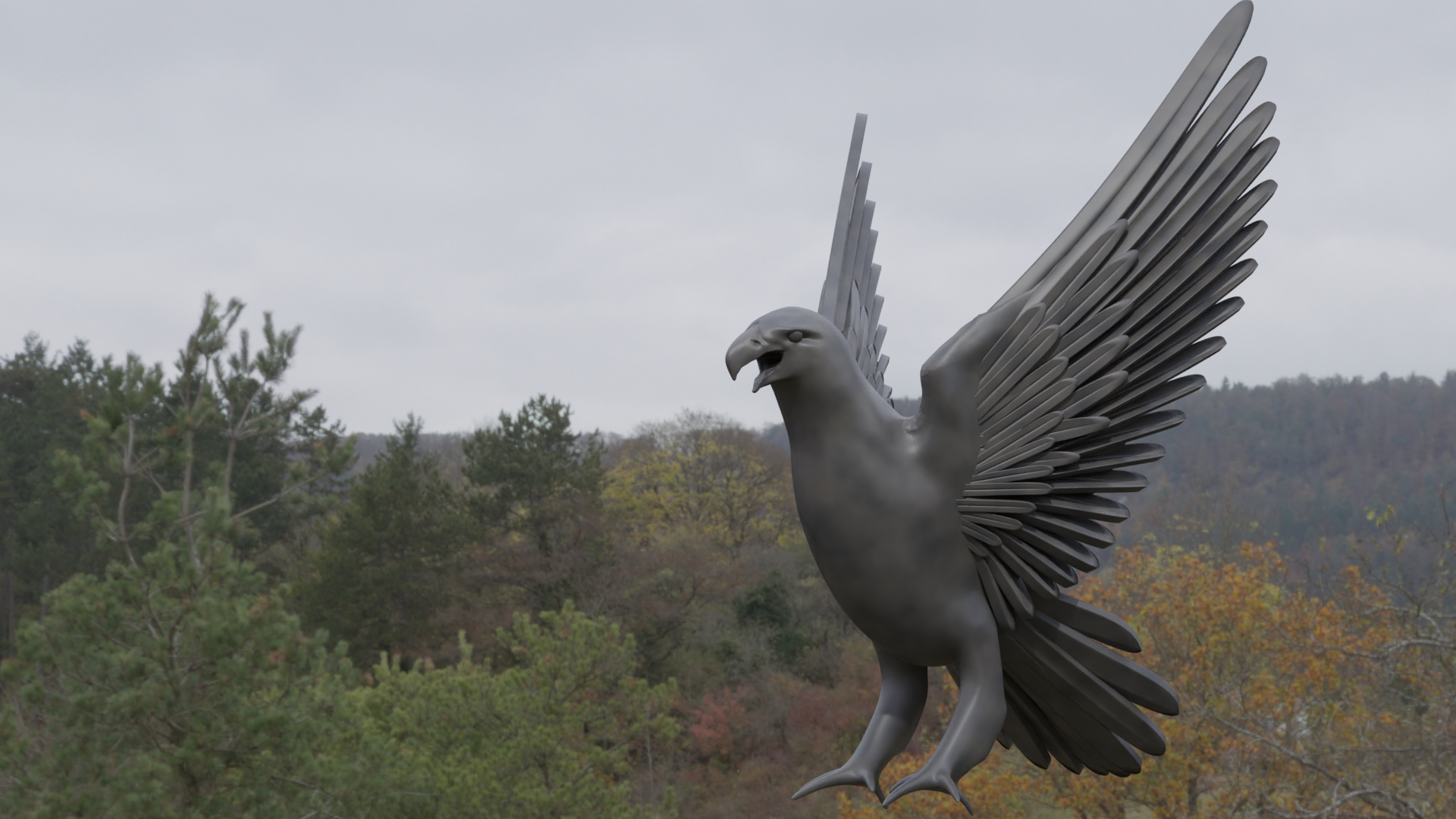
This brought the sculpt of the golden eagle to a state of completion! But at this point, this was all still real geometry – millions of tiny flat triangles connected together to form a complex, bumpy surface that slowed my computer down quite a bit. That’s where normal maps come in. I retopologized the statue into a nice, simple, clean mesh*…
…and then I baked all the details from the original sculpt into a normal map, an image that simulates the shading of the original detailed sculpt on the new simplified mesh. The result looks virtually identical, but the simplified model is waaaaaay less sluggish in terms of software performance, render times, and animatibility. (Shut up, I’ve decided it’s a word now.)
Next steps: creating the rattlesnake, posing the eagle to hold it, integrating the whole statue into the main model, and damaging the fountain to match its dilapidated state in the film. But I’ll save all that for another post. In the meantime, I’m just glad I decided to spend the extra time on this. Confession: I’d never actually done a full-on organic model like this, start to finish, from base mesh to sculpting to retopo and normal baking. It’s really boosted my confidence!
On a more serious note, I’m sure the recent months, weeks, and days have been very difficult for a lot of you. Sending lots of love, with the hopes that we will live to see – and create – a better tomorrow together.
* I’m not an expert in topology and edge flow…if you are, I very much welcome your critique! I’m sure I overcomplicated parts of this mesh, and there were a couple of hidden areas where I decided to just cut my losses and learn from my mistakes next time. The wings feature some staggeringly bad topology – spiral loops, super-squashed quads, and even a lone triangle – but I didn’t care much because these are almost entirely hidden by the feathers. They don’t even have any detail sculpted on them.
Golden eagles and moving staircases can get frustrating. Sometimes you just need to return to your comfort zone and make some turrets. That’s what led me to spend some time (for once) on a version of Hogwarts that’s NOT the one from the third film! We’re going all the way back to the beginning, to a simpler time before the back of Hogwarts got its elaborate clock tower and courtyard. We’re going back to Harry Potter and the Philosopher’s/Sorcerer’s Stone!
In addition to giving me some relief from the project’s more challenging tasks, this gave me a chance to play a bit with this project’s whole primary purpose: providing 3D comparisons between different versions of the model. So I built a new version of the quad’s outer wall, but in its original state, before the hospital wing and clock tower and so forth were added for Azkaban. It’s very difficult to find information about this area of the original model, but I think I’ve been able to get a pretty close facsimile:
Still woefully incomplete, of course, but the cool thing is that I could keep the camera in the exact same spot and render a direct comparison with the (also incomplete) POA version:
This is the kind of stuff I want to get into when the project is reaching its final stages. I’d even like to let the camera glide slowly around the model as things change from film to film…I think that would be visually appealing and very informative.
(Now’s also as good a time as any to point out that I’m now on Instagram; I don’t necessarily post a lot, but feel free to follow there as well if you’d like!)
Anyway, no idea how long I’ll be working on this SS version of the castle right now; I’ll have to get back to those statues sooner or later. We’ll see what my next post ends up being about!
Prisoner of Azkaban‘s clock tower courtyard has a large fountain in the center, featuring arched pediments and four statues of birds eating snakes. [EDIT: Many thanks to bentarr1 for pointing out that the golden eagle devouring a rattlesnake is an important symbol in Mexican culture, ostensibly a tribute to Alfonso Cuarón’s nationality.] Like the rest of the courtyard, the fountain has seen better days – whole chunks of it have crumbled away. This makes for a different challenge than the rest of the castle, which has an aged look but hasn’t actually fallen apart.
Thanks to a variety of folks who’ve taken photos of the technical drawings at the Warner Bros. Studio Tour, I’ve got a lot of detailed reference on the top part of the fountain, so I decided to start there. The fountain will be built in complete, pristine form first…then I get to go in and destroy it. (I’ll make a copy, don’t worry!) I started with some of the arches:
The intersecting curves are tricky to stitch together. I’m again very grateful for Blender’s TinyCAD add-on, which makes the job somewhat less painful, especially because there’s a lot of it here:
It looks great in gray, but it’ll look even better when I apply my standard stone texture from the castle, right?
Ew. Never mind. Looks like I’m gonna need to create a new material specifically for this fountain. I’ll put a pin in that for now. Back to plain gray as we give this thing some rotational symmetry:
Dang, kinda makes me sad that they went and destroyed half of the thing…the pre-eroded design is really pretty! Anyway, the top part’s also got a lot of detail, but this pediment’s no impediment:
Then all that’s left for the top part is to add some pinnacles to the corners – interestingly, not quite the same design as the pinnacles on the Great Hall, or even the nearby clock tower entrance. Voilà:
I dig it! Next up will be the base of the fountain, the columns, the bird statues, and the texturing – not necessarily in that order.
More staircase stuff to come, but for now, back to the main project! With my clock tower photogrammetry in place, I was able to finish up the clock tower’s entryway, again relying more on shots of the set than shots of the miniature, since that area is really only visible from above or from within the courtyard. Fortunately, the sets seem to match the miniature pretty well here. Even though the miniature as currently installed at Leavesden has the doors closed and portcullis down, I decided to keep mine nice and open. My Hogwarts is a welcoming, friendly place. Just look at all the people.
Awkward. Well, anyway, the details look cool, but it’s hard to see beyond the archway; it gets darker in the shadows. Let’s crank up the exposure a little and move beneath the arch to take in all this stuff that we’ll rarely see otherwise!
The actual interior is still dark and boring, but there’ll soon be big windows on the other side of the room.
Let’s talk about those doors, by the way. John Williams wrote a cue for the scene in which they’re locked to secure the school, and he called it “The Big Doors”. He wasn’t kidding. They’re HUGE – around 67 or 68 feet tall, by my estimation. I’m sure they only built the bottom portion for the set, but in the miniature, they just go up and up and up. Imagine the weight…imagine trying to open or close them by hand…
Anyway, the next step was to add windows on the other faces of the clock tower, as well as the details on the dormers along the roof. (Fortunately, these seem to be very similar or identical to the ones on the roof of the Defense Against the Dark Arts building, which I’ve already created, so this didn’t take long.)
With those finished, there are precisely three details left to add to the clock tower: the big window in the back, a small arch at one of the corners, and another door at another corner. Oh, and probably the clock pendulum, too. So four. But I can’t find good reference for the big window, and there’s no point in putting in the pendulum till I have the big window to silhouette it against…and the placement of the arch and door will depend on the placement of the courtyard, and I’m not going to build the courtyard till I’ve built the ruined fountain in the middle. (No sense in enclosing the courtyard and then having to constantly hide pieces to build the stuff inside.) So the fountain is up next!
Let’s continue with the Prisoner of Azkaban clock tower! I created the columns and elaborate moulding below the clock. As you can see in this “work in progress” render, everything was still separate from the building at this point:
But as these areas became more complete, I began placing them correctly along the building. I also discovered some issues with how I’d built the facade last year, so I decided to simply redo some of it altogether. Below, you can see some of the old walls removed for replacement as I maneuvered the new elements into position:
I resisted the urge to simplify some of these details, and I’m glad I did. The results were worth it the effort! This has become one of the most detailed areas of the model so far, mostly because the original design has a lot of details, but also because the available reference material is so good. Maybe it’s a good thing I don’t have detail drawings for most of the castle…everything would take so much longer if I could get this precise with everything:
Fun fact, by the way: see that arch at the bottom of the last render? In the miniature, it’s just got open air behind it, but they created a full-sized set for a shot in Order of the Phoenix, and in that version, it’s actually a balcony. (Umbridge and Filch are standing up there.) They don’t appear to have changed the miniature; I’m going to leave the balcony out.
Moving downward, we arrive at this lovely Gothic pediment that frames the entryway. No technical drawings for this one, so I had to just rely on as many reference images as I could find. Shots of this spot on the miniature are virtually impossible to get in the Warner Bros. Studio Tour, so most of my references are actually from the corresponding set, and some of the details can vary between the sets and the miniatures. Anyway, the modeling process looked much like building the arches above, so I won’t bore you with too many in-progress shots:
I also discovered how good Blender’s denoising has gotten, which means I can drastically speed up my renders. My poor machine only chugged for 15 minutes or so on these images, rather than an hour or more.
Anyway, as I got to the very bottom of the tower, where it meets the courtyard, I started feeling the need for more data. So I went on another photogrammetry spree, trying to create meshes from every possible shot of the courtyard/clock tower set in the film. (There are a lot of them!) Accuracy and precision are very important to me with this project – partly just so I know I’m getting something close to the “real thing”, and partly because I know from past experience that small errors have a way accumulating. You estimate the height of object B on object A, and then you estimate the height of object C on object B, etc., and before you know it, lots of small inaccuracies begin to add up…and sooner or later, those will clash noticeably with other estimations elsewhere on the model.
I’d like to avoid that, which is why I ended up with over a dozen photogrammetry meshes (with different lighting and even different seasons) thrown together to get a more complete picture of the courtyard!
Ugly, yes, but very helpful as I prepare to complete the clock tower and start on the courtyard.
P.S. Don’t let me forget to finish the hospital wing.












 Hogwarts 4D